Python中将变量按行写入txt文本中
发布时间:2019-07-31 09:29:34编辑:auto阅读(2971)
先看一个简单的例子:将变量写入txt文本中
f = open('E:/test.txt','w')

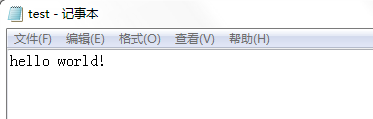
f.write('hello world!')
Out[3]: 12

f.close()
结果如图:
那么如何将变量按行写入呢?
在'w'写入模式下,当我们下次写入变量时,会覆盖原本txt文件的内容,这肯定不是我们想要的。TXT有一个追加模式'a',可以实现多次写入:
f = open('E:/test.txt','a')

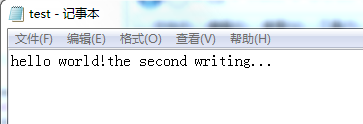
f.write('the second writing...')
Out[6]: 21

f.close()
结果如图:
如果要按行写入,我们只需要再字符串开头或结尾添加换行符'\n'即可:
f = open('E:/test.txt','a')

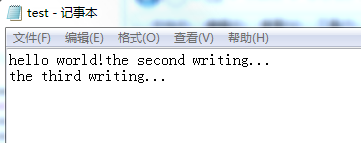
f.write('\nthe third writing...')
Out[9]: 21

f.close()
结果如图:
如果想要将多个变量同时写入一行中,可以使用writelines()函数:
f = open('E:/test.txt','a')

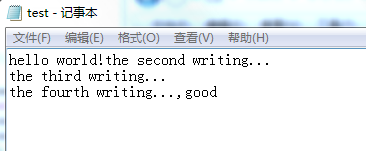
f.writelines(['\nthe fourth writing...',',','good'])

f.close()
结果如图:
参考:
上一篇: python中list的四种查找方法
下一篇: 启动Python
- H3C基本命令大全
54316
- H3C IRF原理及 配置
41077
- Python exit()函数
35591
- python全系列官方中文文档
31202
- python 获取网卡实时流量
26086
- 1.常用turtle功能函数
25823
- python 获取Linux和Windows硬件信息
24287
- 天天基金网数据接口
19831
- Selenium使用代理IP&无头模式访问网站
15878
- Selenium&Pytesseract模拟登录+验证码识别
15334
- LangGraph Studio可视化
2156°
- LangSmith开发-应用入门
1982°
- LangGraph开发-多轮对话问答机器人
2077°
- LangGraph开发-条件分支/循环图实战
2180°
- LangGraph开发-生态介绍,入门demo实战
2167°
- LangChain-接入12306-HTTP MCP智能体
2352°
- LangChain接入自定义爬虫-MCP工具
2304°
- LangChain接入Filesystem-MCP工具
2113°
- LangChain搭建MCP服务端和客户端流程
2181°
- LangGraph与MCP技术概述
2165°
- 姓名:Run
- 职业:谜
- 邮箱:383697894@qq.com
- 定位:上海 · 松江