django.core.exceptions.ImproperlyConfigured: SQLite 3.8.3 or
发布时间:2019-05-17 17:54:40编辑:Run阅读(9460)
启动Django
python36 manage.py runserver 0.0.0.0:8888
报错信息如下:
django.core.exceptions.ImproperlyConfigured: SQLite 3.8.3 or later is required (found 3.7.17)

sqlite的版本太低需要升级.
下载sqlite源码包安装:
wget http://www.sqlite.org/2019/sqlite-autoconf-3280000.tar.gz
解压:
tar zxvf sqlite-autoconf-3280000.tar.gz -C /usr/src/
编译安装:
cd /usr/src/sqlite-autoconf-3280000/
./configure --prefix=/usr/local/sqlite
make && make install
替换版本
mv /usr/bin/sqlite3 /usr/bin/sqlite3_old
cd /usr/local/sqlite/bin/
ln -s sqlite3 /usr/bin/sqlite3
共享库修改,注意sqlite的安装路径
vim /etc/profile
export LD_LIBRARY_PATH="/usr/local/sqlite/lib"
配置生效
source /etc/profile
查看sqlite版本信息
sqlite3 --version
3.28.0 2019-04-16 19:49:53 884b4b7e502b4e991677b53971277adfaf0a04a284f8e483e2553d0f83156b50
python查看sqlite版本信息:
[root@crawler-03 bin]# python36
Python 3.6.8 (default, Apr 4 2019, 10:34:20)
[GCC 4.8.5 20150623 (Red Hat 4.8.5-36)] on linux
Type "help", "copyright", "credits" or "license" for more information.
>>> import sqlite3
>>> sqlite3.sqlite_version
'3.28.0'
>>>
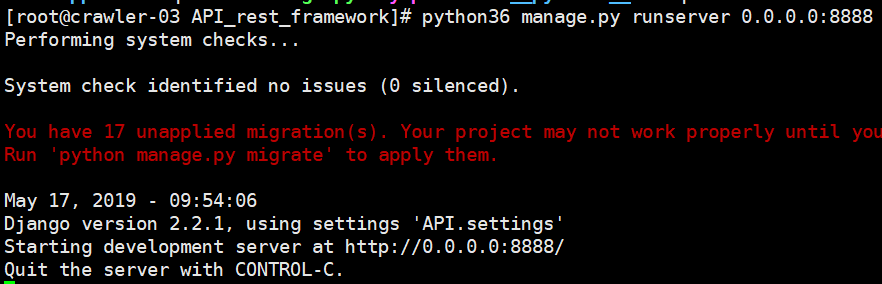
运行django
python36 manage.py runserver 0.0.0.0:8888
- H3C基本命令大全
54699
- H3C IRF原理及 配置
41477
- Python exit()函数
36072
- python全系列官方中文文档
31547
- python 获取网卡实时流量
26443
- 1.常用turtle功能函数
26148
- python 获取Linux和Windows硬件信息
24673
- 天天基金网数据接口
20262
- Selenium使用代理IP&无头模式访问网站
16226
- Selenium&Pytesseract模拟登录+验证码识别
15642
- LangGraph Studio可视化
2677°
- LangSmith开发-应用入门
2421°
- LangGraph开发-多轮对话问答机器人
2530°
- LangGraph开发-条件分支/循环图实战
2664°
- LangGraph开发-生态介绍,入门demo实战
2618°
- LangChain-接入12306-HTTP MCP智能体
2846°
- LangChain接入自定义爬虫-MCP工具
2757°
- LangChain接入Filesystem-MCP工具
2604°
- LangChain搭建MCP服务端和客户端流程
2628°
- LangGraph与MCP技术概述
2604°
- 姓名:Run
- 职业:谜
- 邮箱:383697894@qq.com
- 定位:上海 · 松江