python利用gzip压缩解压缩Str
发布时间:2019-08-12 09:52:11编辑:auto阅读(2805)
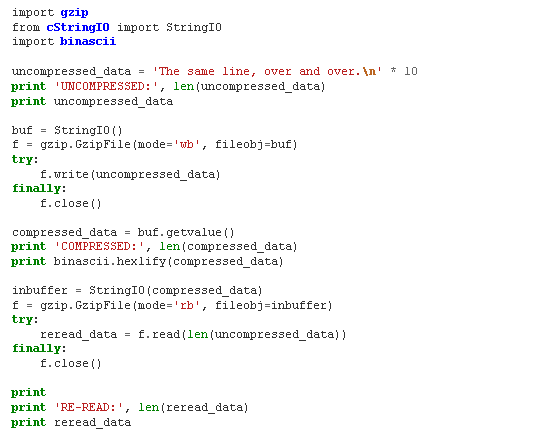
When working with a data stream instead of a file, use the GzipFileclass directly to compress or uncompress it. This is useful when thedata is being transmitted over a socket or from read an existing(already open) file handle. A StringIO buffer can also be used.
Note
When re-reading the previously compressed data, I pass an explicit length toread(). Leaving the length off resulted in a CRC error, possibly becauseStringIO returned an empty string before reporting EOF. If you areworking with streams of compressed data, you may want to prefix the data withan integer representing the actual amount of data to be read.
我按照他的方法,自己写了一下:
>>> import gzip
>>> from cStringIO import StringIO
>>> puredata = 'test'
>>> buf=StringIO()
>>> f=gzip.GzipFile(mode="wb", fileobj=buf)
>>> f.write(puredata)
4
>>> f.close()
>>> cdata = buf.getvalue()
>>> print cdata
ヒ
>>> print len(cdata)
24
>>> import binascii
>>> print binascii.hexlify(cdata)
1f8b0800e0a3ab4f02ff2b492d2e01000c7e7fd804000000
>>> inbuffer = StringIO(cdata)
>>> f = gzip.GzipFile(mode="rb", fileobj=inbuffer)
>>> rdata = f.read()
>>> print rdata
test
成功
之前压缩完了之后总是解压缩不成,提示:
IOError: CRC check failed 0xab380008L != 0x0L
后来发现没有调用f.close(),加上之后就好了
上一篇: Python 2.7 和 Python
下一篇: python:链表定义以及实现
- H3C基本命令大全
55070
- H3C IRF原理及 配置
41872
- Python exit()函数
36464
- python全系列官方中文文档
31859
- python 获取网卡实时流量
26768
- 1.常用turtle功能函数
26445
- python 获取Linux和Windows硬件信息
24980
- 天天基金网数据接口
20593
- Selenium使用代理IP&无头模式访问网站
16516
- Selenium&Pytesseract模拟登录+验证码识别
15929
- LangGraph Studio可视化
3121°
- LangSmith开发-应用入门
2829°
- LangGraph开发-多轮对话问答机器人
2922°
- LangGraph开发-条件分支/循环图实战
3077°
- LangGraph开发-生态介绍,入门demo实战
3008°
- LangChain-接入12306-HTTP MCP智能体
3281°
- LangChain接入自定义爬虫-MCP工具
3172°
- LangChain接入Filesystem-MCP工具
3010°
- LangChain搭建MCP服务端和客户端流程
2995°
- LangGraph与MCP技术概述
2981°
- 姓名:Run
- 职业:谜
- 邮箱:383697894@qq.com
- 定位:上海 · 松江